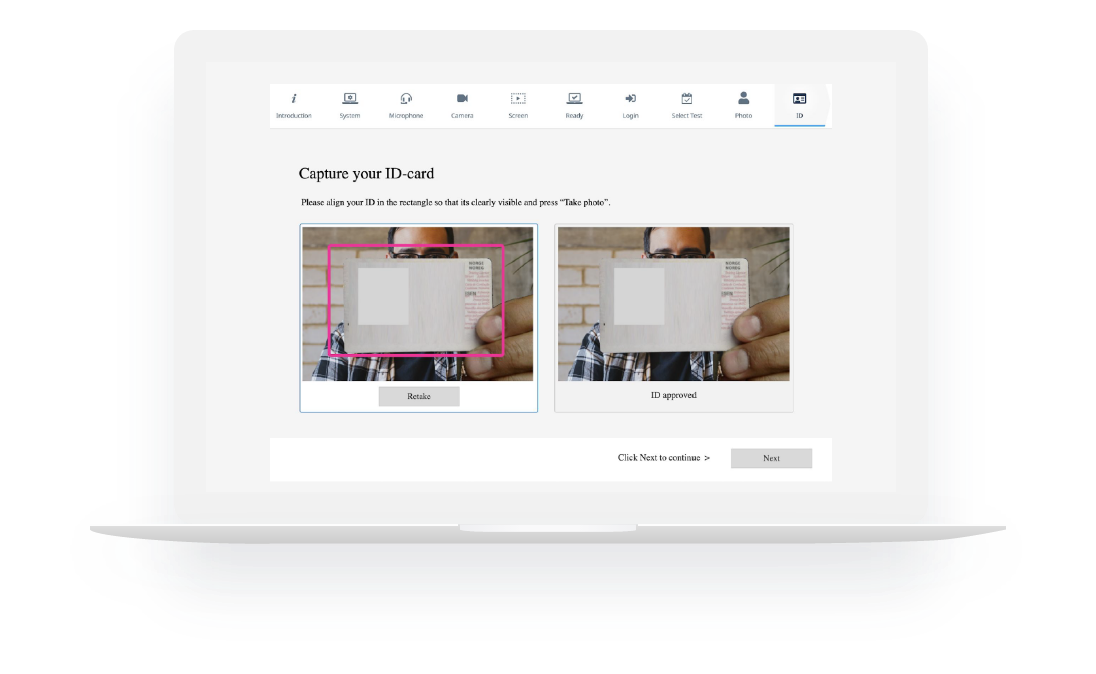
Inspera Proctoring provides monitoring of candidates via your choice of their camera, microphone and screen recording. It offers a wide range of flexible and scalable proctoring options that can be integrated into Inspera Assessment or an LMS, from recorded to live.
Functionalities
Identity verification with a built-in mechanism checking the student’s identity throughout the entire exam
Video and audio recordings of each test-taker’s webcam and screen, which provides extensive evidence and allows to verify any suspicious behavior
Automatic marking of suspicious events such as the appearance or disappearance of a face other than the student taking the exam in the frame or recorded noise
Conduct safe and reliable remote exams as a real alternative to stationary exams
A consistent e-examination process, whether on or off campus
Safe archiving of the exam recordings with easy access for verification
Administration
Change any device into a secure workstation, preventing access to unauthorized programs and resources
Save time needed for monitoring by viewing only suspicious events
Ensure the continuity of the examination process also in the event of loss of internet access
Students
Take exams on your own device and at home
Standardized and consistent remote examination process for all classes
Works even when internet connection is lost
Discover all PCG products
DSpace
E-learning
Low-code
DSpace CRIS
DSpace CRIS is an enhanced version of DSpace, designed for research institutions that require more than just a traditional publication repository. DSpace CRIS is more than a repository –it is a holistic information system connecting researchers, institutions, projects, grants, and citation metrics, providing a comprehensive view of research impact and collaboration.
Conventional keyword search misses context and relationships. AI semantic search tool from PCG Academia understands meaning, not just keywords, linking concepts, datasets and papers even when phrasing differs.
Many scholarly PDFs remain locked in static layouts that hinder readability, searchability and access for users with disabilities. AI-driven conversion tool from PCG Academia automates tagging, OCR correction and semantic structuring to produce interactive documents that work with screen readers.
Information about personal data controllers can be found in the GDPR tab at https://pcgacademia.pl/gdpr/. We kindly ask you to read this information with due attention.
Niniejsza strona wykorzystuje pliki cookies na zasadach określonych w polityce prywatności. Jeśli nie wyrażasz na to zgody, prosimy o wyłączenie obsługi cookies w przeglądarce lub opuszczenie serwisu. Więcej informacji